
FOR BOUTIQUE HOTELS, GUESTHOUSES AND BUNGALOWS
Your hotel in one panel.
Manage it even from your phone.
Reservations, availability calendar, cash desk, housekeeping, restaurant and cafe management, WhatsApp notifications, ID scanning, channel manager connection and direct online booking on your own website: all connected. Nothing to install; open your browser and start.
Your personal live demo link arrives on WhatsApp and by email. The demo resets every night.
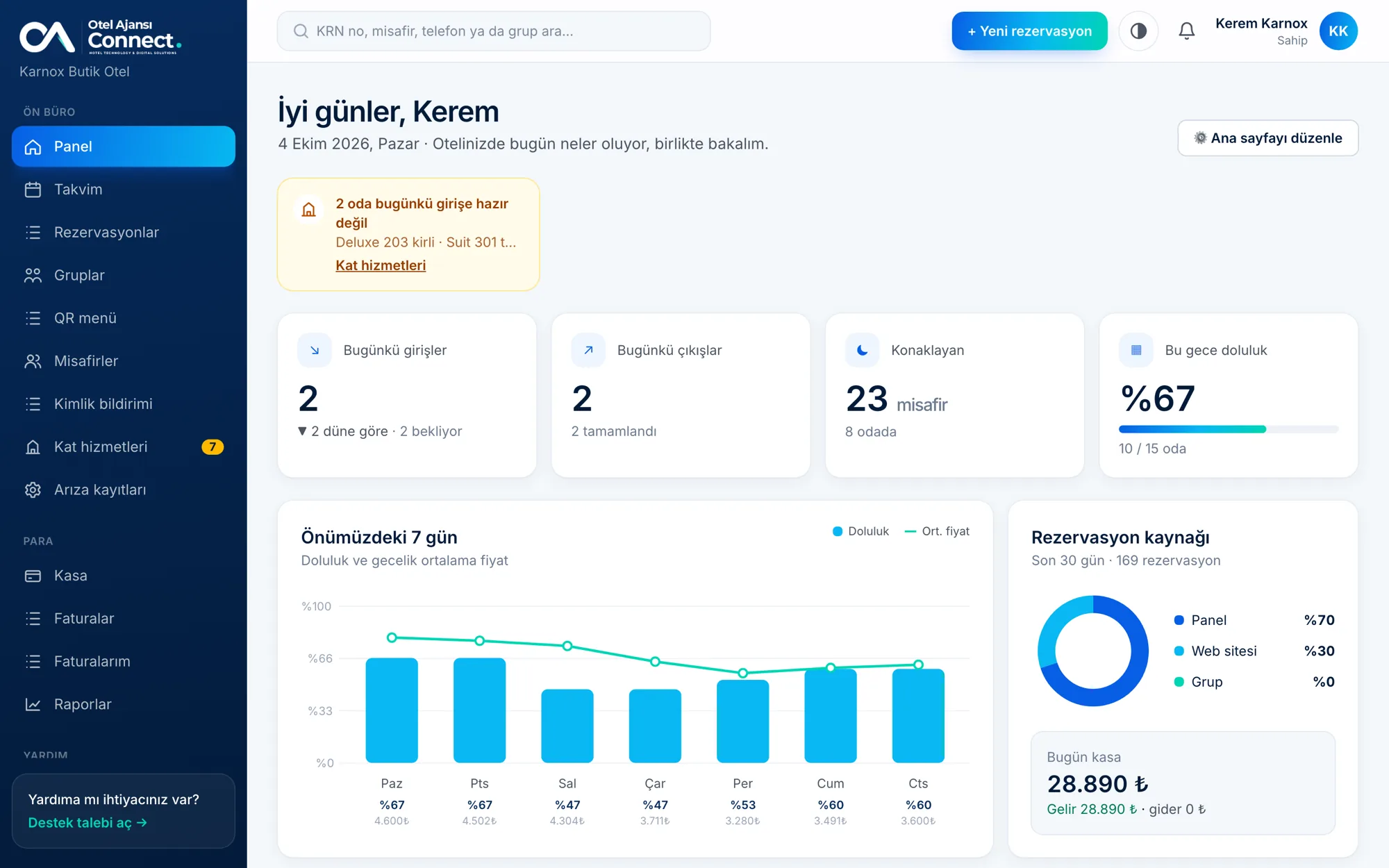
No double bookings
Every room and night is checked for overlaps. The same room can never be sold twice.
Commission-free direct sales
Bookings from your own website come straight to you, and you can take card deposits too.
App-like on every device
Add it to your home screen and get notifications. iOS and Android apps are coming very soon.
Backed up every night
The database is backed up every night and the backup is emailed to you.
OCCUPANCY
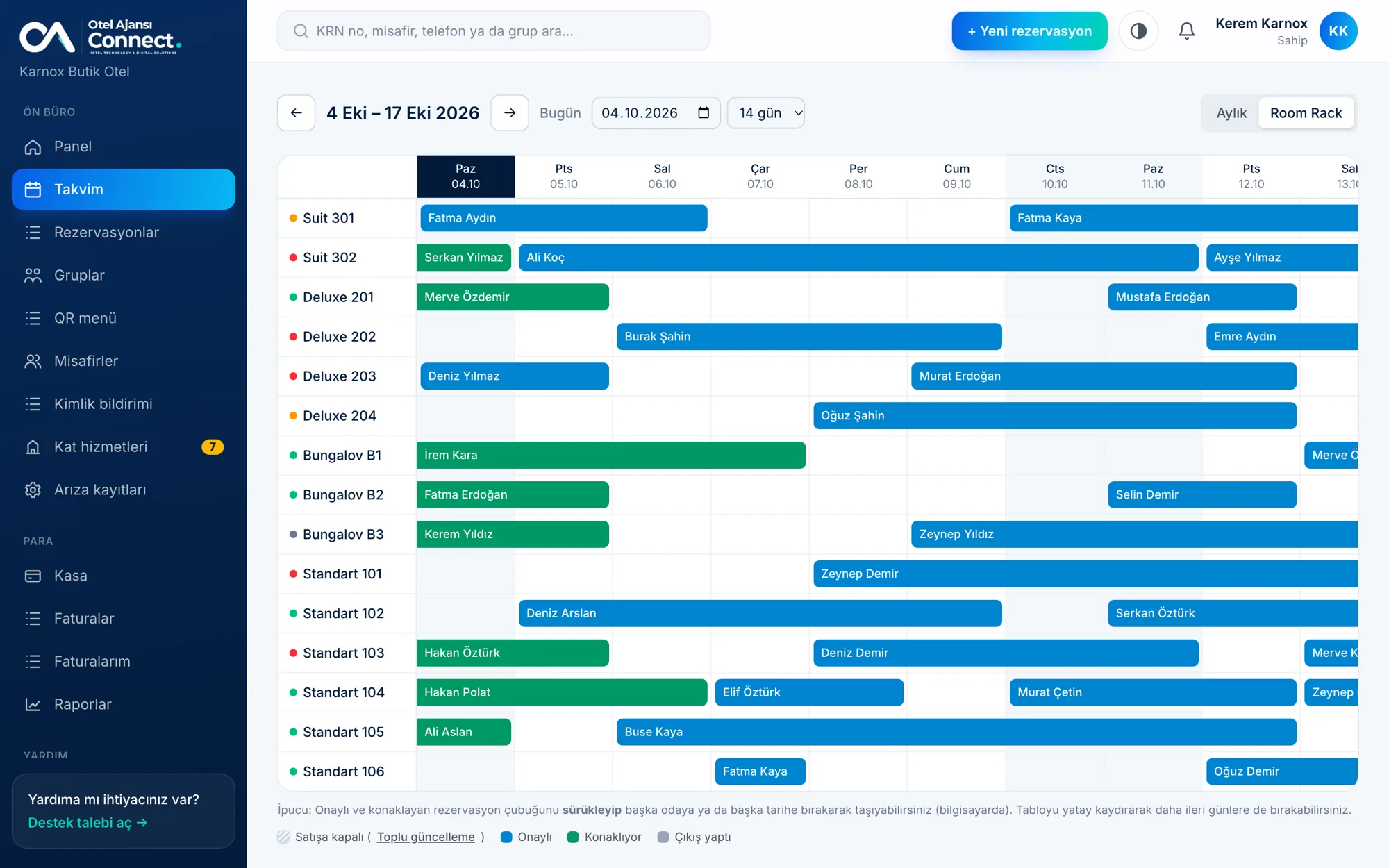
See which room is booked when, at a glance
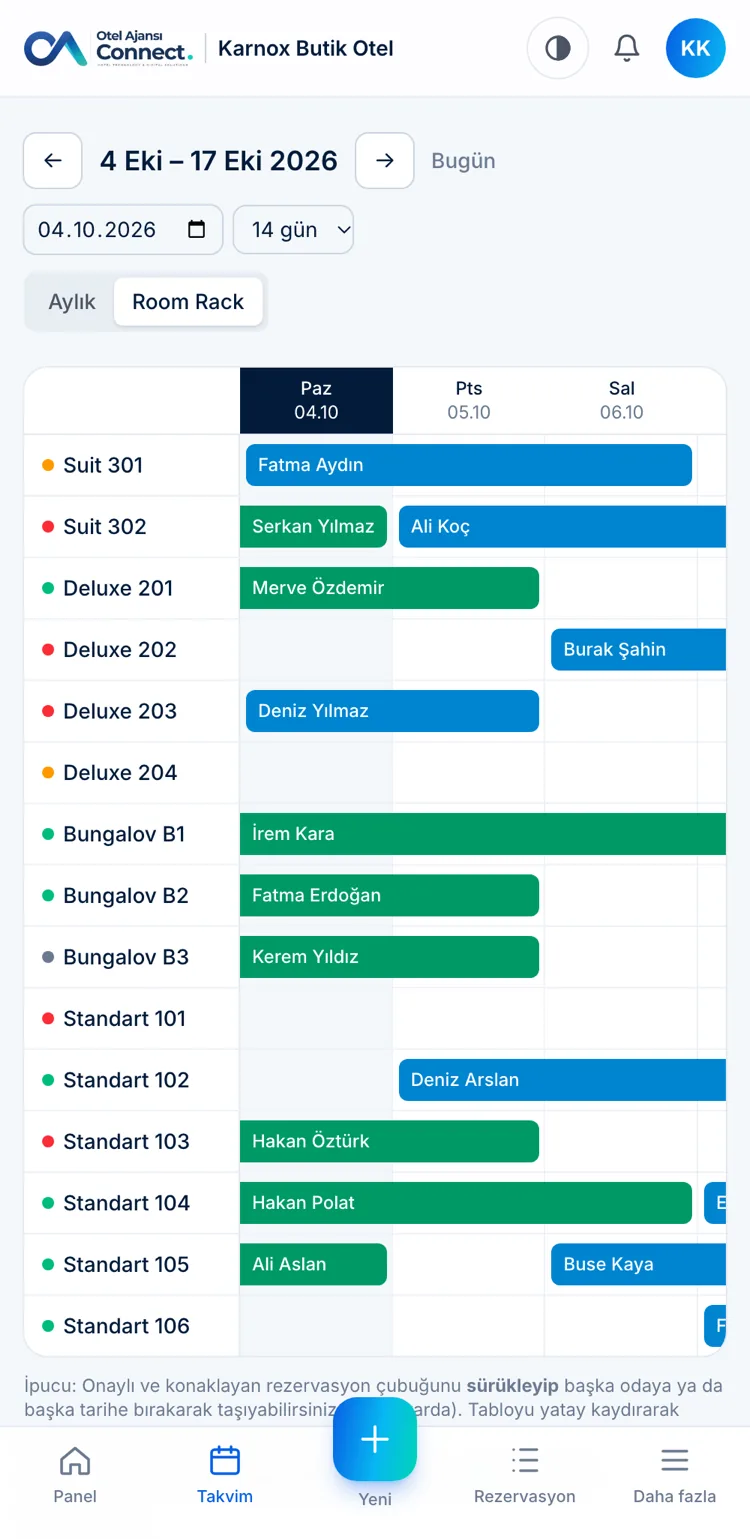
All rooms and days side by side in the Room Rack. Click an empty cell to create a booking, click a bar to open it. The monthly calendar shows free and occupied room counts for every day.
- ✓Arriving, staying and departing guests are color-coded
- ✓Housekeeping status shows as a dot on the rack
- ✓Block rooms for maintenance or your own use over any date range
BOOKINGS AND CASH DESK
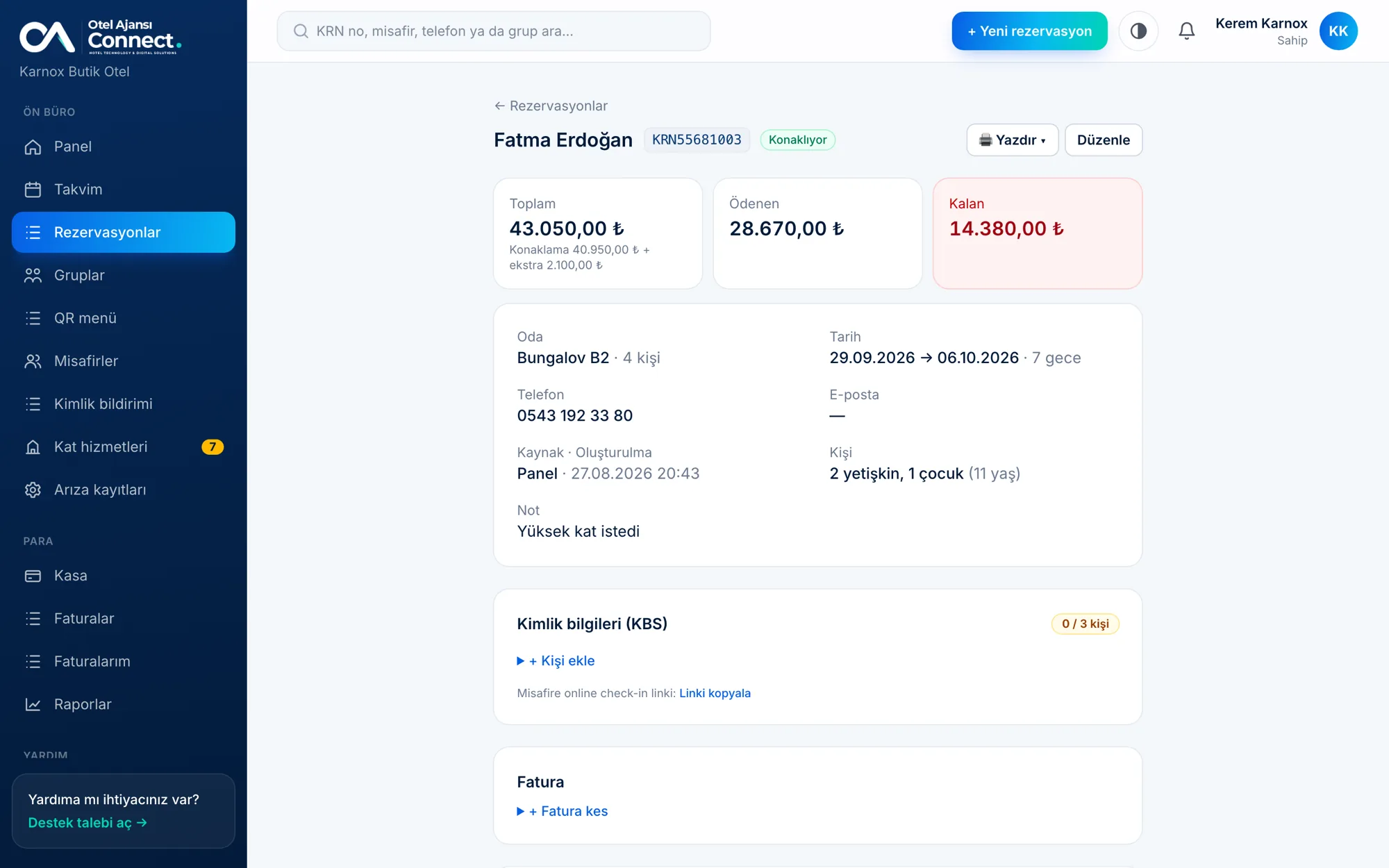
From booking to payment, the account is always clear
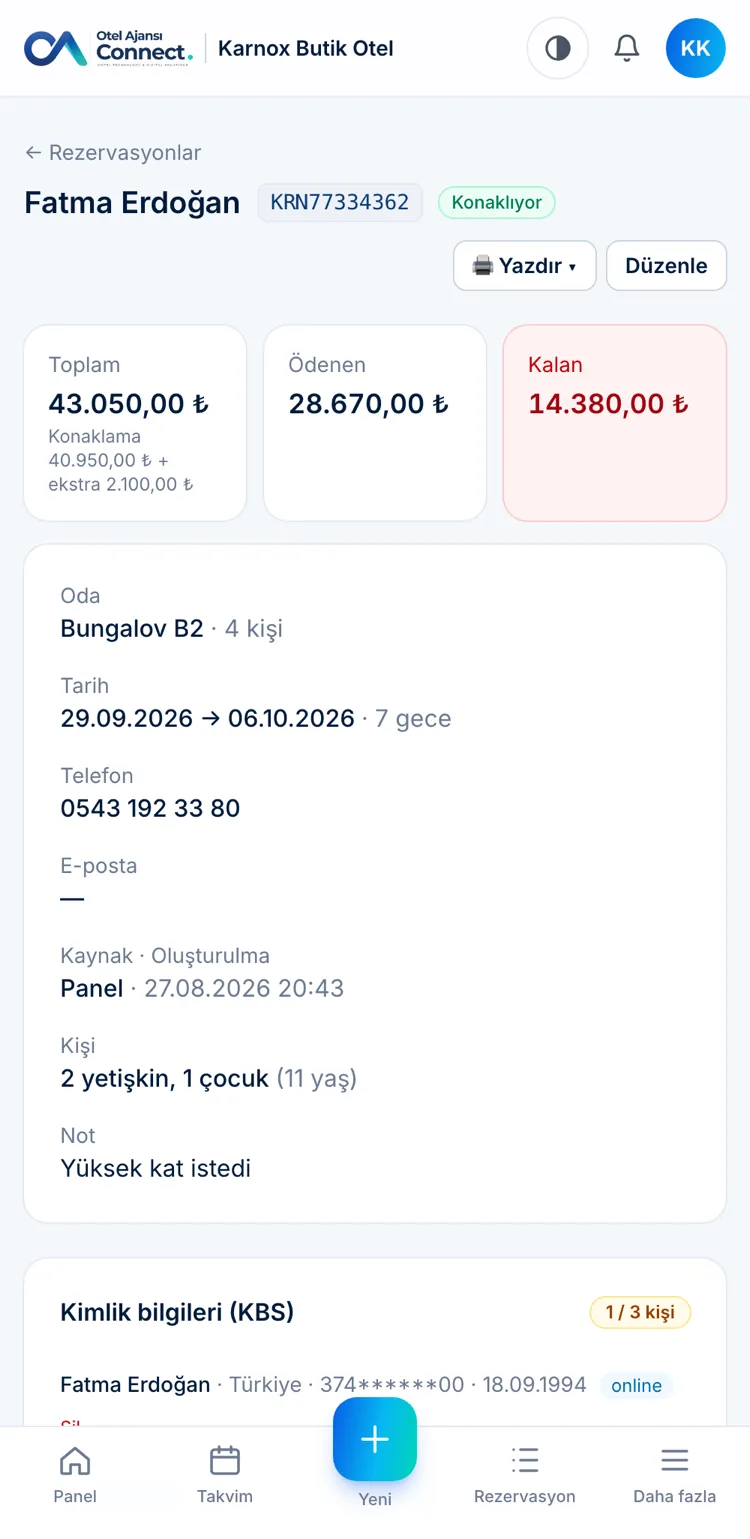
Total, paid and remaining amounts next to every reservation. Add extras such as minibar, restaurant or spa to the folio; post deposits and payments to the cash desk with one click. Printable confirmation, statement and registration card are ready.
- ✓KRN-coded reservation numbers and search in the list
- ✓Bulk check-in, check-out and payment for group bookings
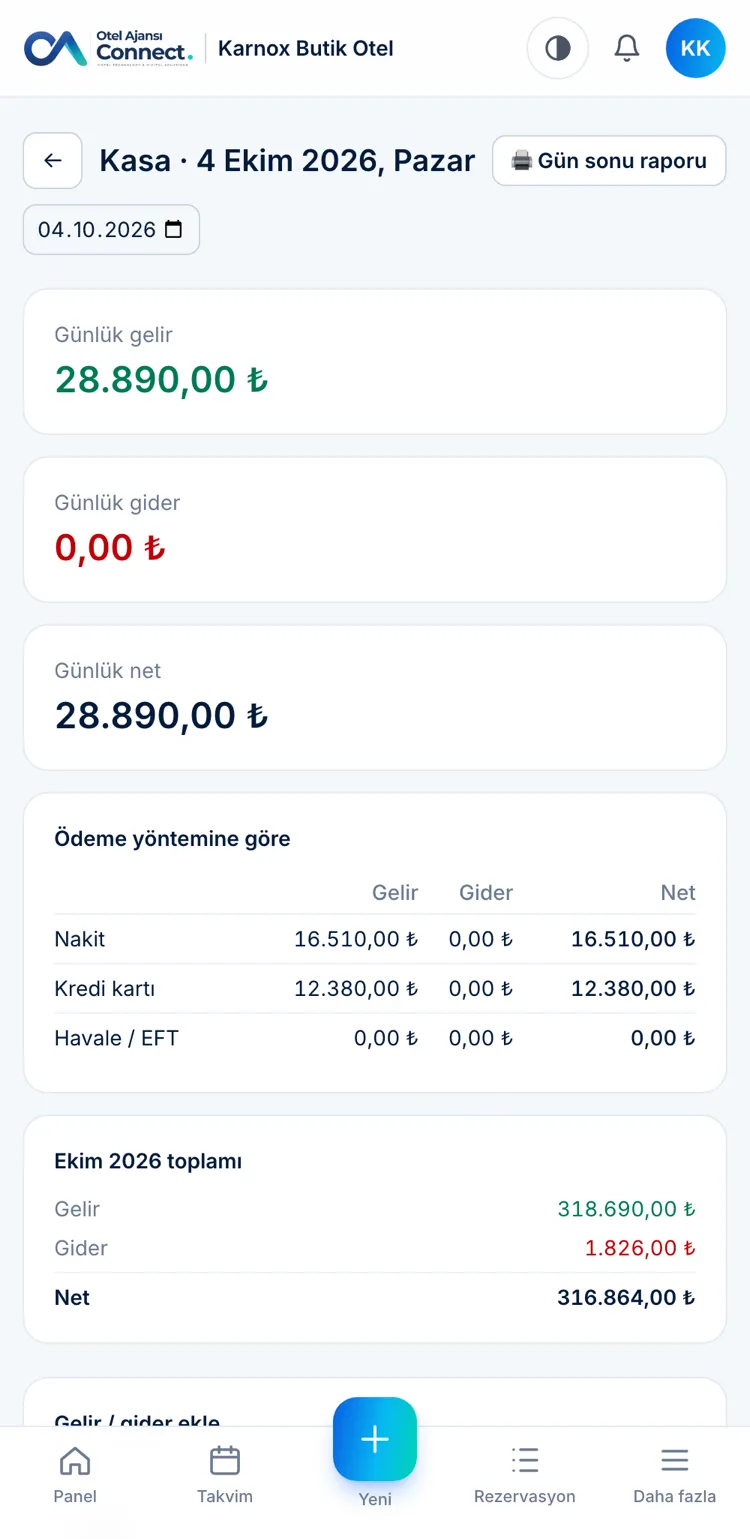
- ✓Daily cash desk, breakdown by payment method and an end-of-day report
PRICING AND AVAILABILITY
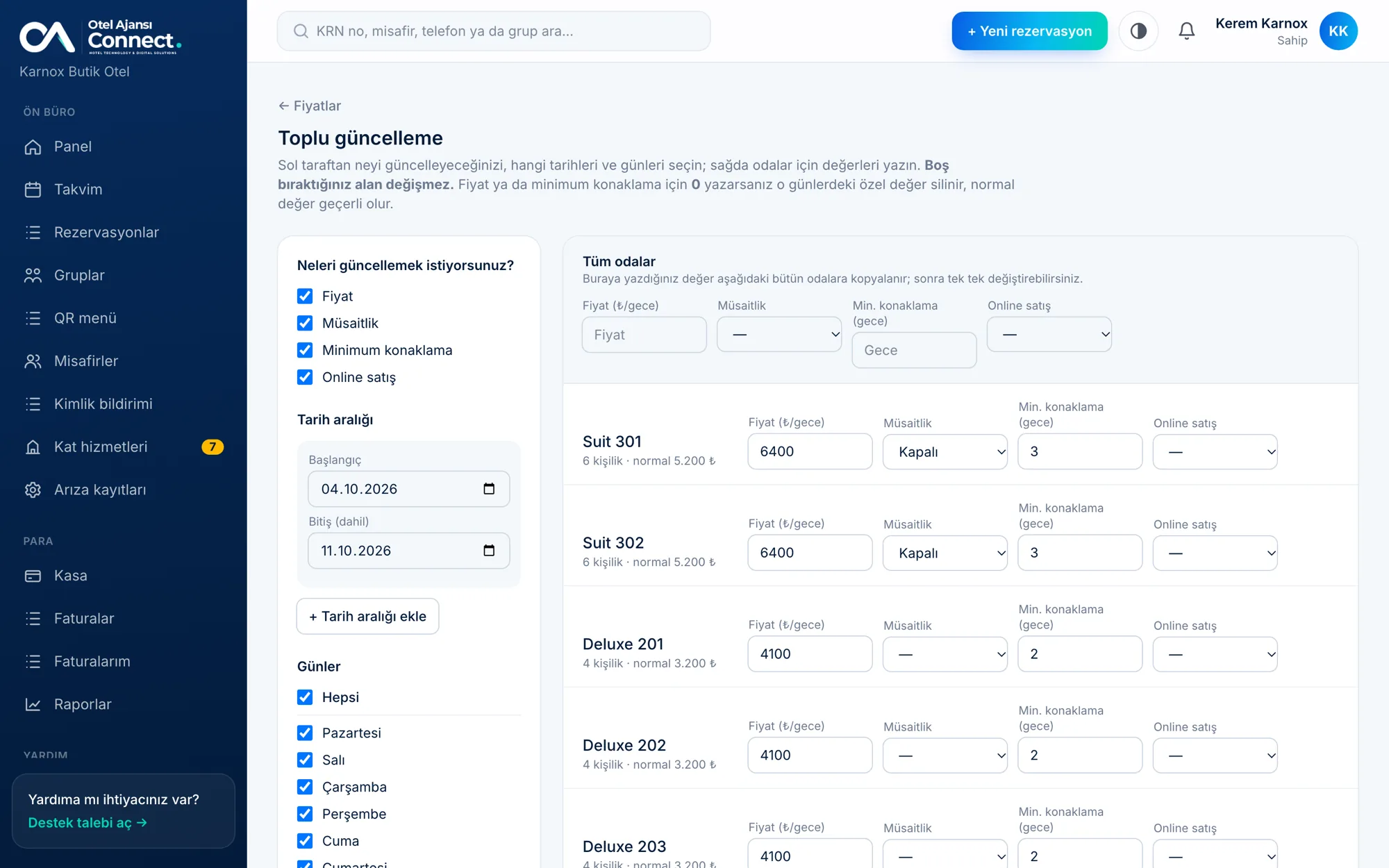
Type the price, pick the dates, done
No percentage math: you simply type the room price for that date. Season, holiday and weekend prices are entered separately. With bulk update you change prices, open/closed status and minimum stay for all rooms from one screen.
- ✓Bulk update by date range and day of the week
- ✓Per-guest, child and extra-adult pricing on each room
- ✓Minimum stay and stop-sell for online booking
ONLINE BOOKING
Take commission-free bookings from your website
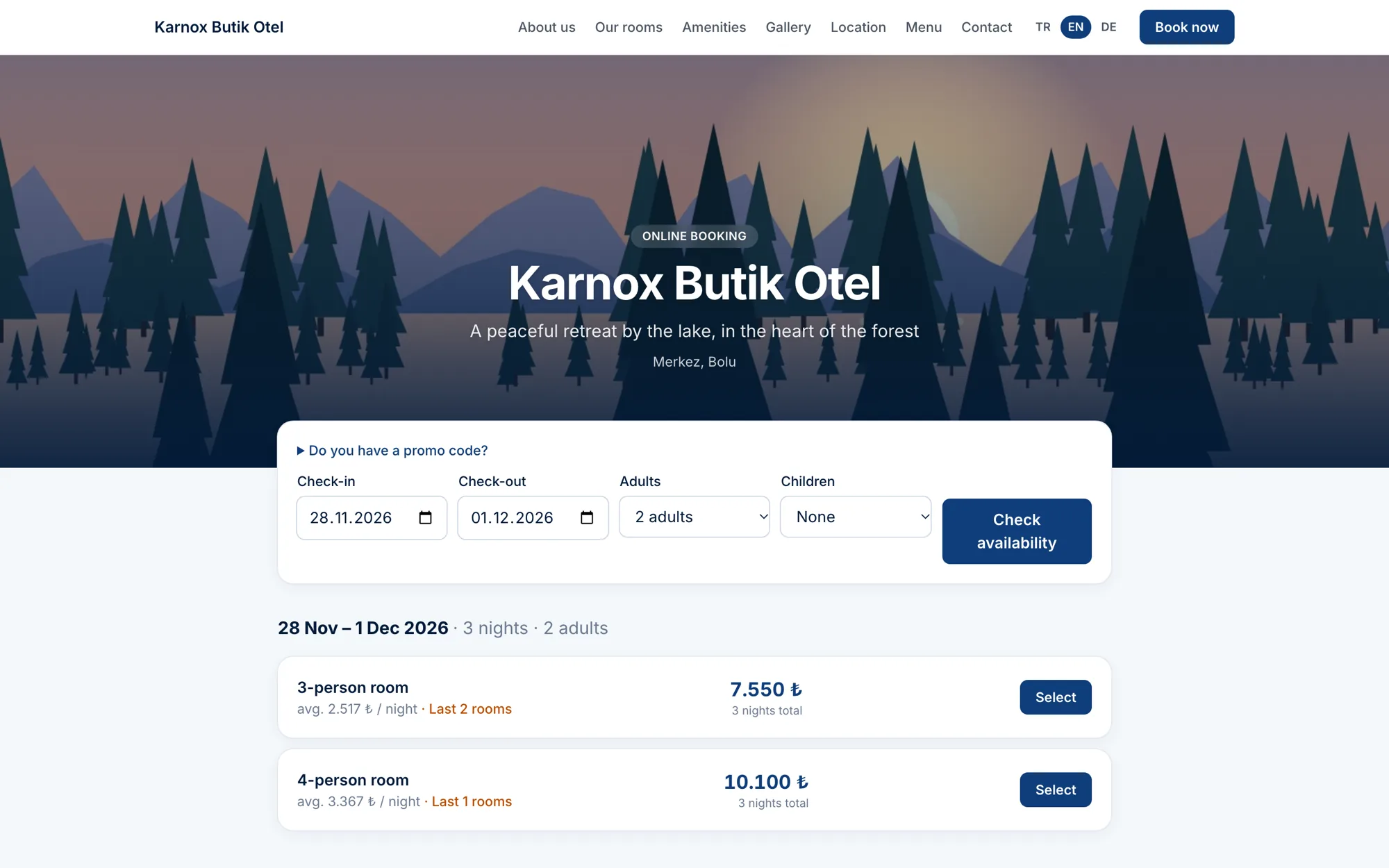
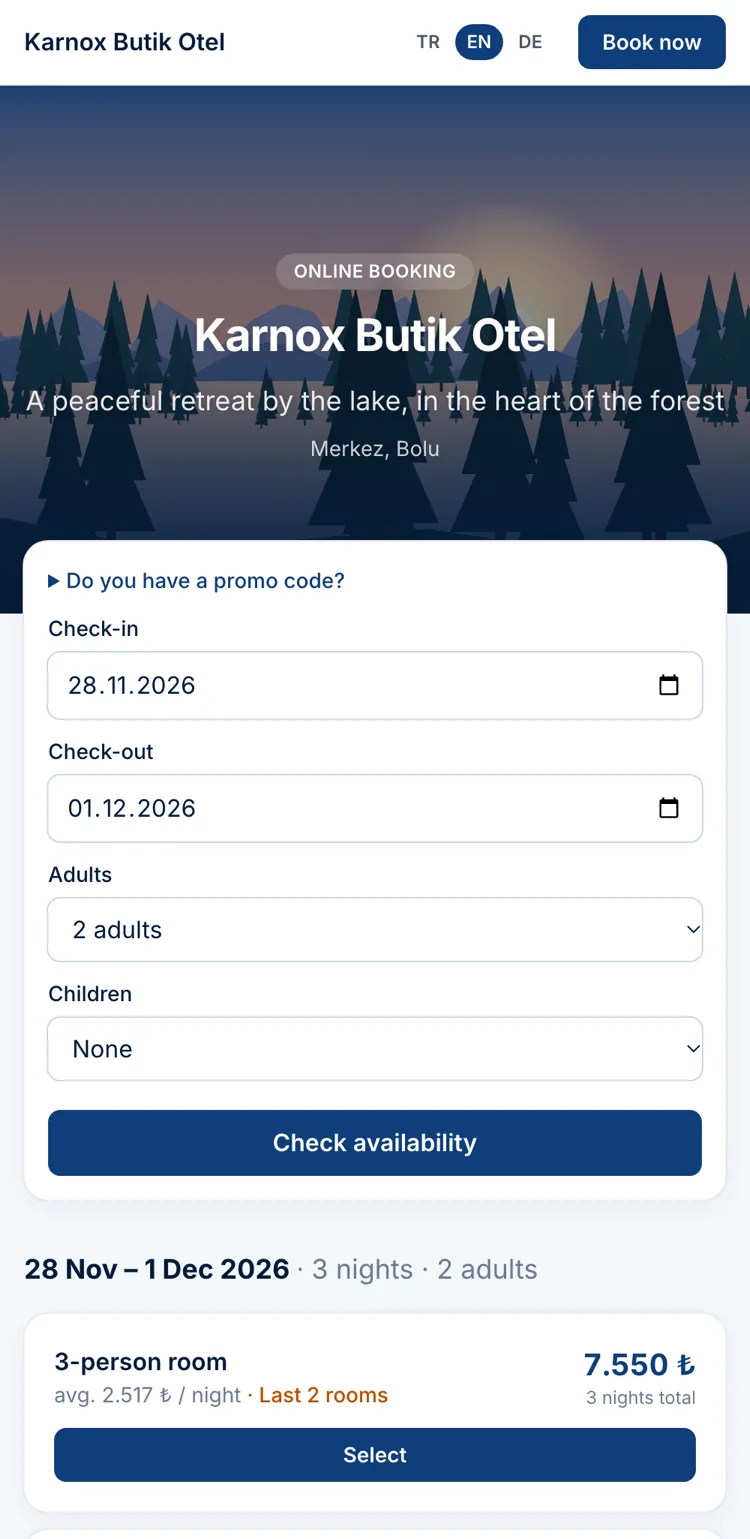
Your own booking page is ready. Guests pick dates, see available rooms and prices, and book; you are notified instantly. You can also add a date-picker box to your existing site with a single line of code.
- ✓Your photos, description and contact details
- ✓Automatic confirmation by email, WhatsApp or SMS to the guest; instant notification to you
- ✓Card deposits, promo codes and a page in Turkish, English and German
RESTAURANT AND CAFE
The hotel's restaurant, cafe and bar in the same panel
From table to kitchen, from kitchen to bill: waiter POS, kitchen display, ordering from the QR menu, stock and recipe costing. Charging to the room works with the stay; no separate program, no separate records.
Explore the restaurant and cafe softwareWaiter POS and tabs
Floor plan, item options, split and merge tabs, comps and discounts; cash, card, room charge and house-account payments.
Kitchen display
Orders land on stations such as hot, cold and bar; preparation time, delays and serving status are visible live.
QR menu and table ordering
Guests scan the QR on the table and order from the menu with its options; the order goes straight to the kitchen.
Room service and stay packages
Room service verified by room number and surname; half-board and all-inclusive rules and room-charge reconciliation.
Stock, recipes and cost
Sales deduct stock by recipe; goods receipt, waste, counts, transfers and a gross-profit report per product.
Restaurant bookings
Table bookings with overlap checks; when guests arrive, the tab opens on their table with one tap.
MOBILE APP
In your pocket, like an app
Our iOS and Android apps are being prepared for the App Store and Google Play and will be available very soon. Meanwhile you can open the panel in your phone browser and add it to your home screen, so everyone at reception and in housekeeping carries their own screen.
- Instant notificationsNew bookings, late arrivals, cash summaries and license alerts land on your phone.
- Bottom menu and one-tap new bookingRight where your thumb is: Panel, Calendar, New, Bookings.
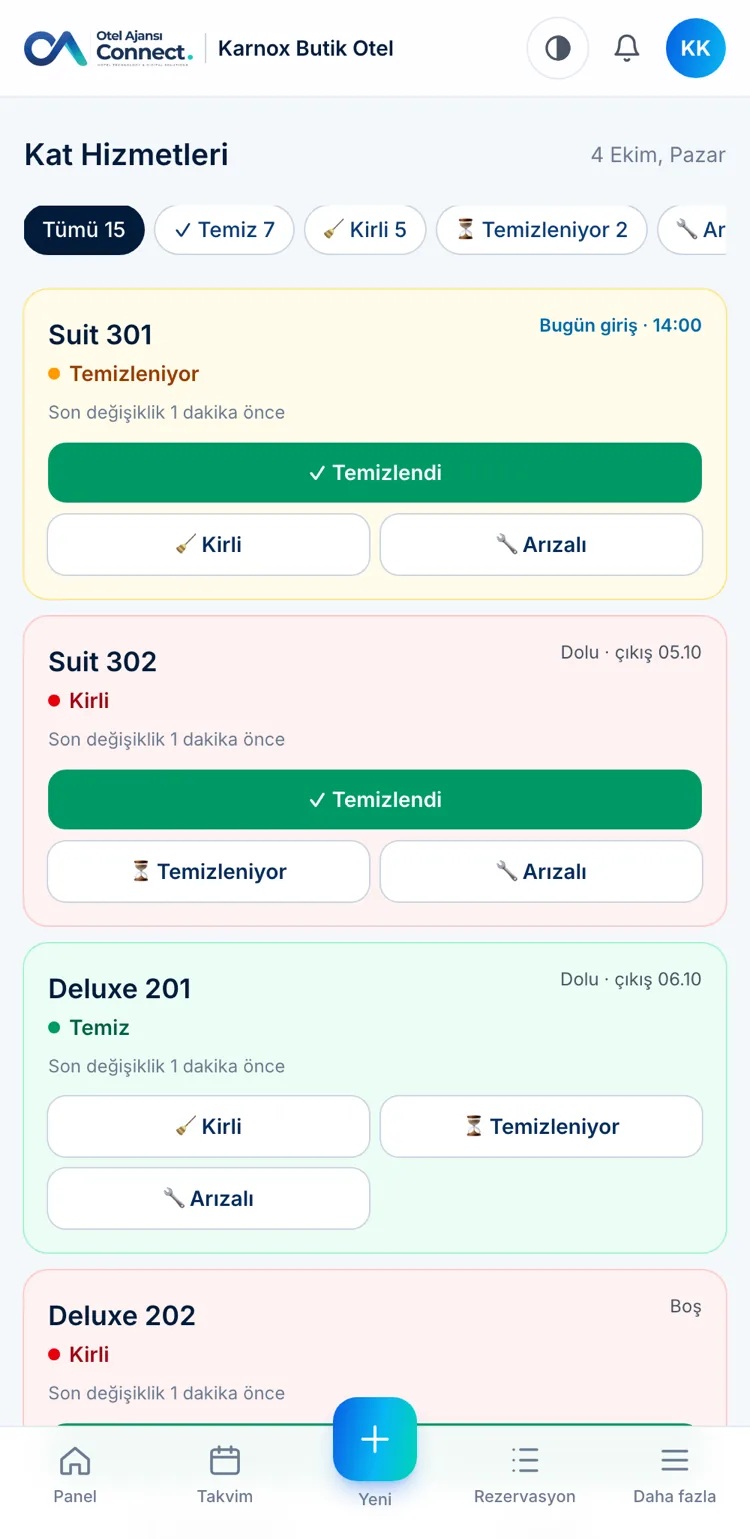
- A screen made for housekeepersMark a room clean, dirty or out of order with one tap; reception sees it instantly.
SEE THE PRODUCT UP CLOSE
Every screen is designed for your daily work
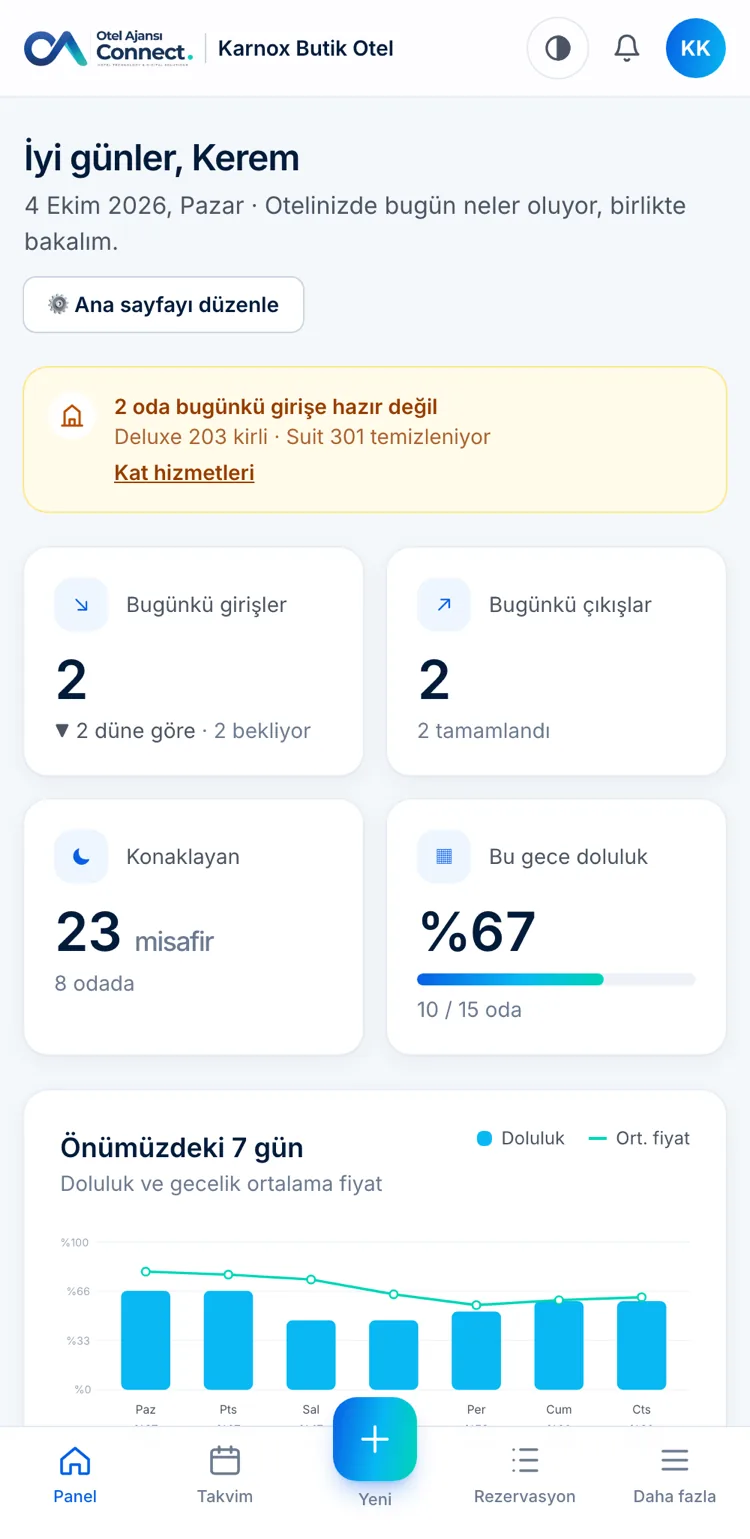
Daily summary: arrivals, departures, occupancy and cash
Room Rack: all rooms and days side by side, reservations as colored bars
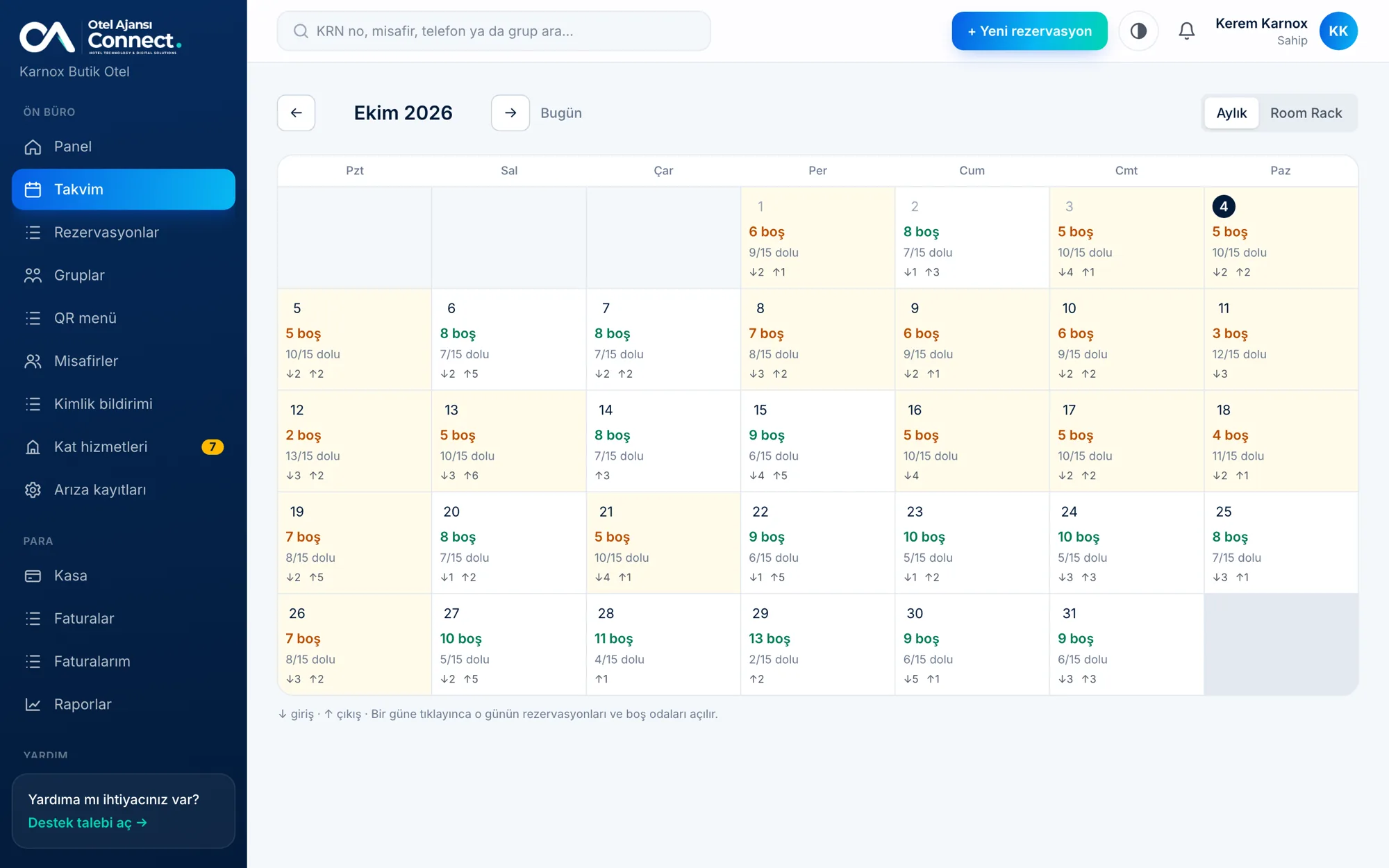
Monthly calendar: free and occupied room counts for each day
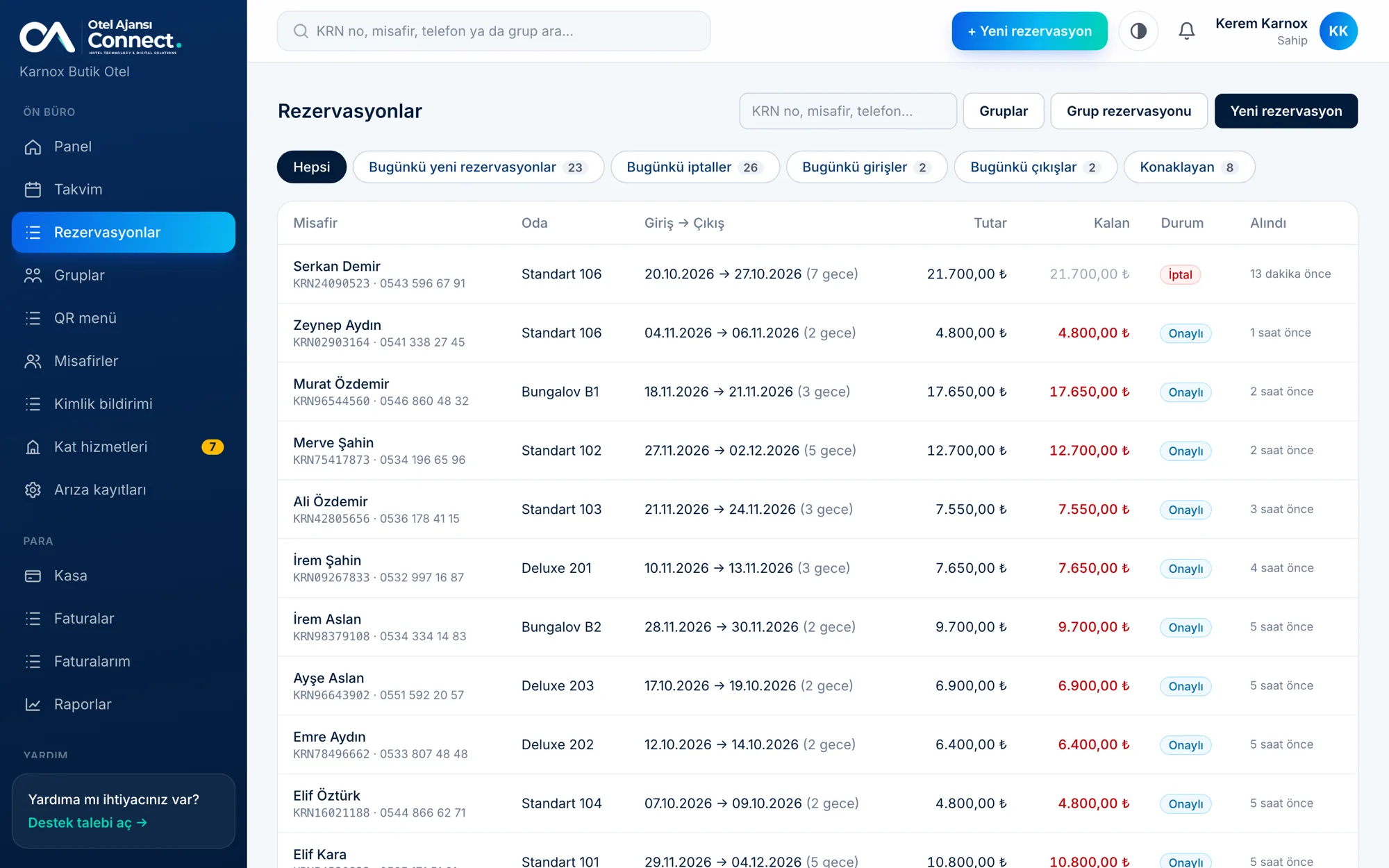
Reservation list: search, status and payment
Reservation detail: total, paid, remaining, ID details and invoice
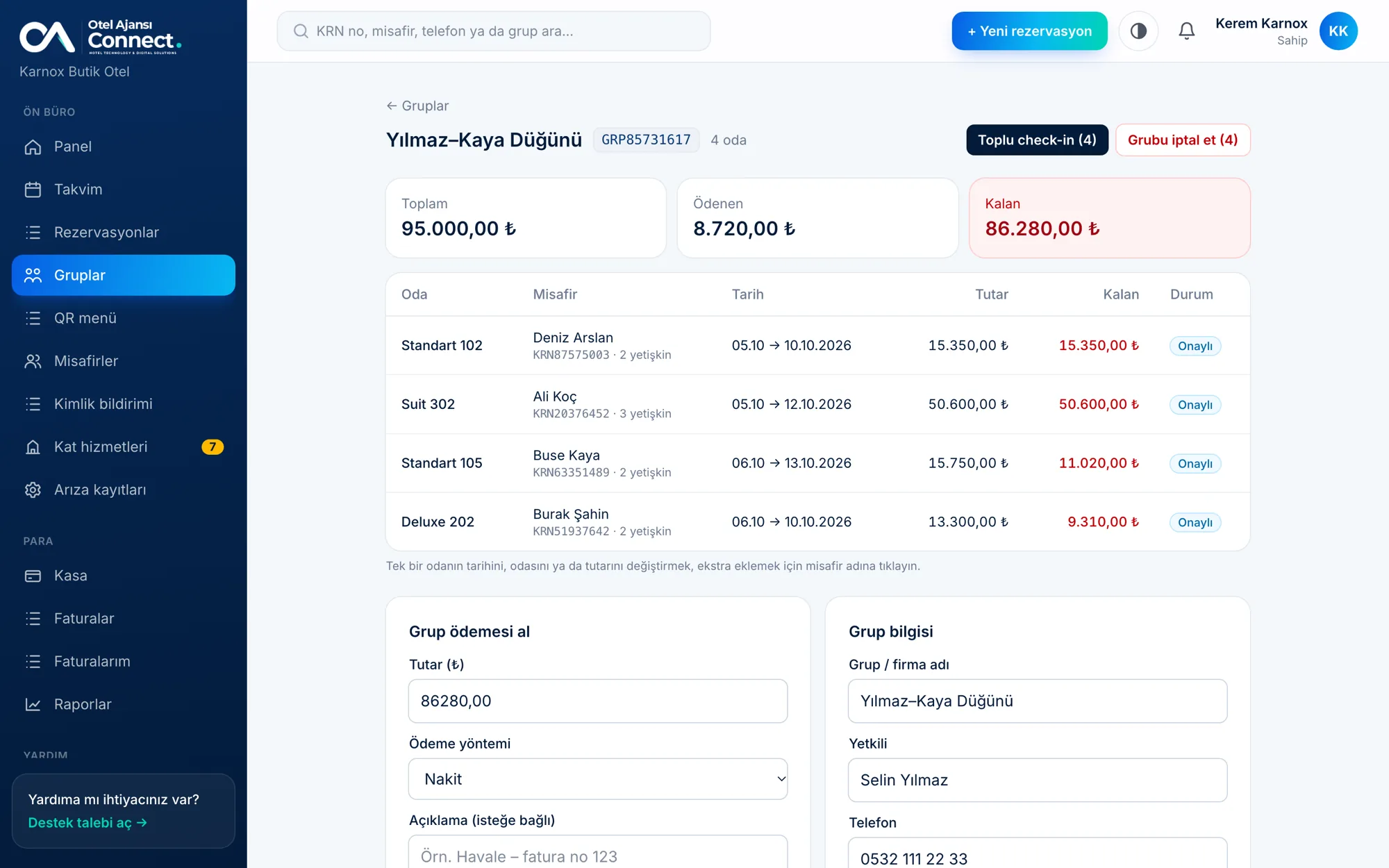
Group booking: combine several rooms into one group with bulk check-in, check-out and payment
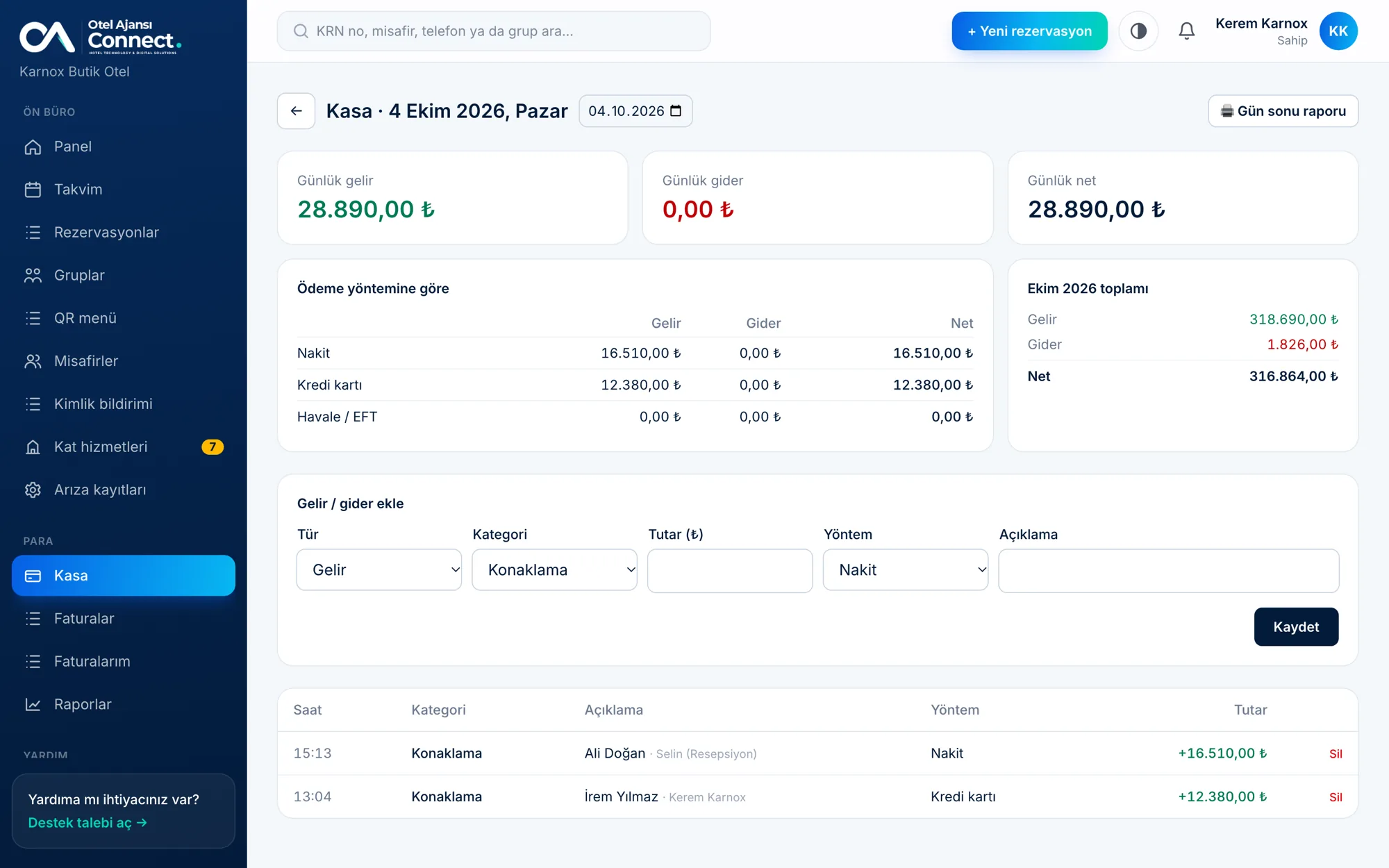
Daily cash desk: income, expenses and breakdown by payment method
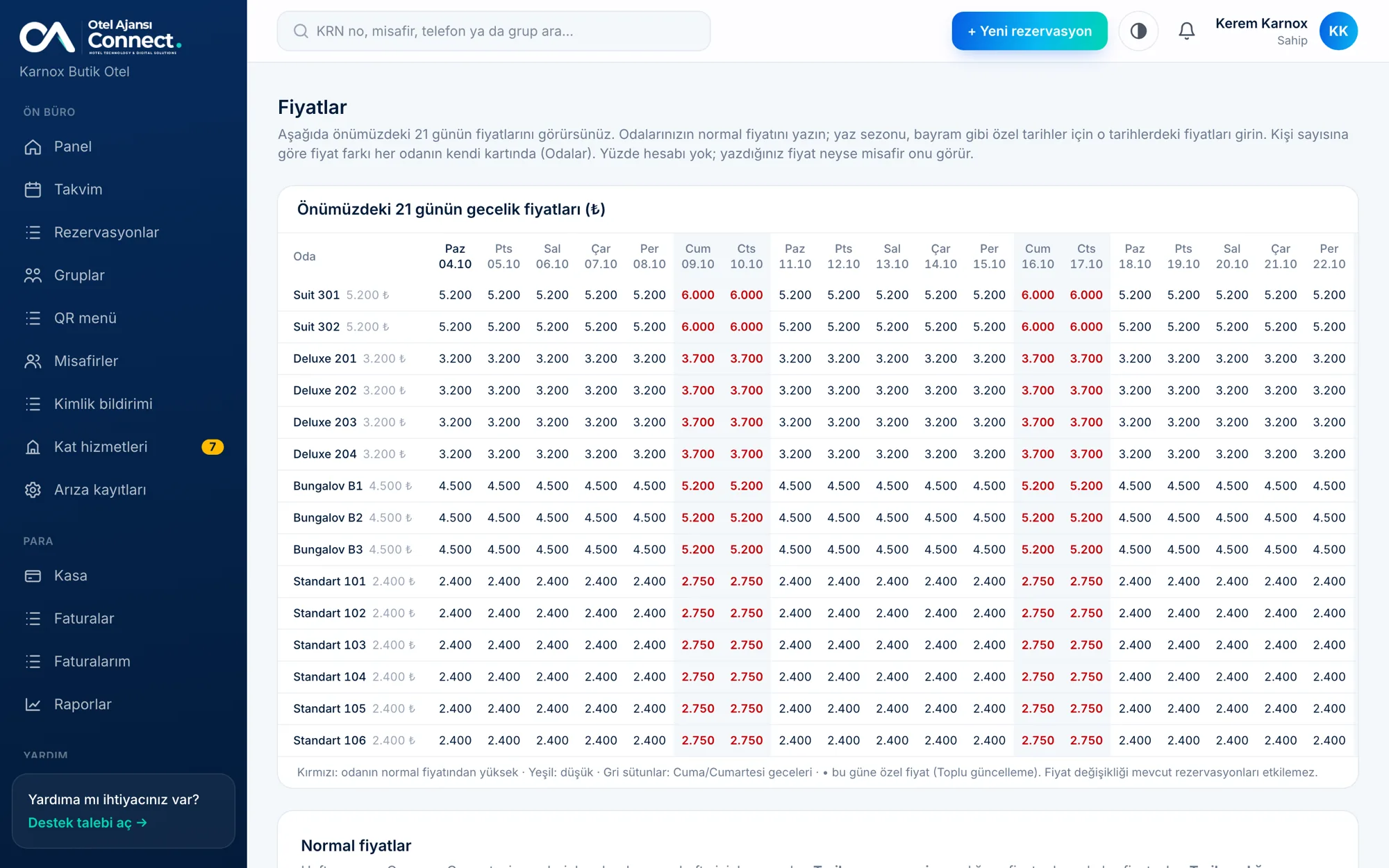
Prices: regular prices and date-range specific prices
Bulk update: price, availability and minimum stay by date range
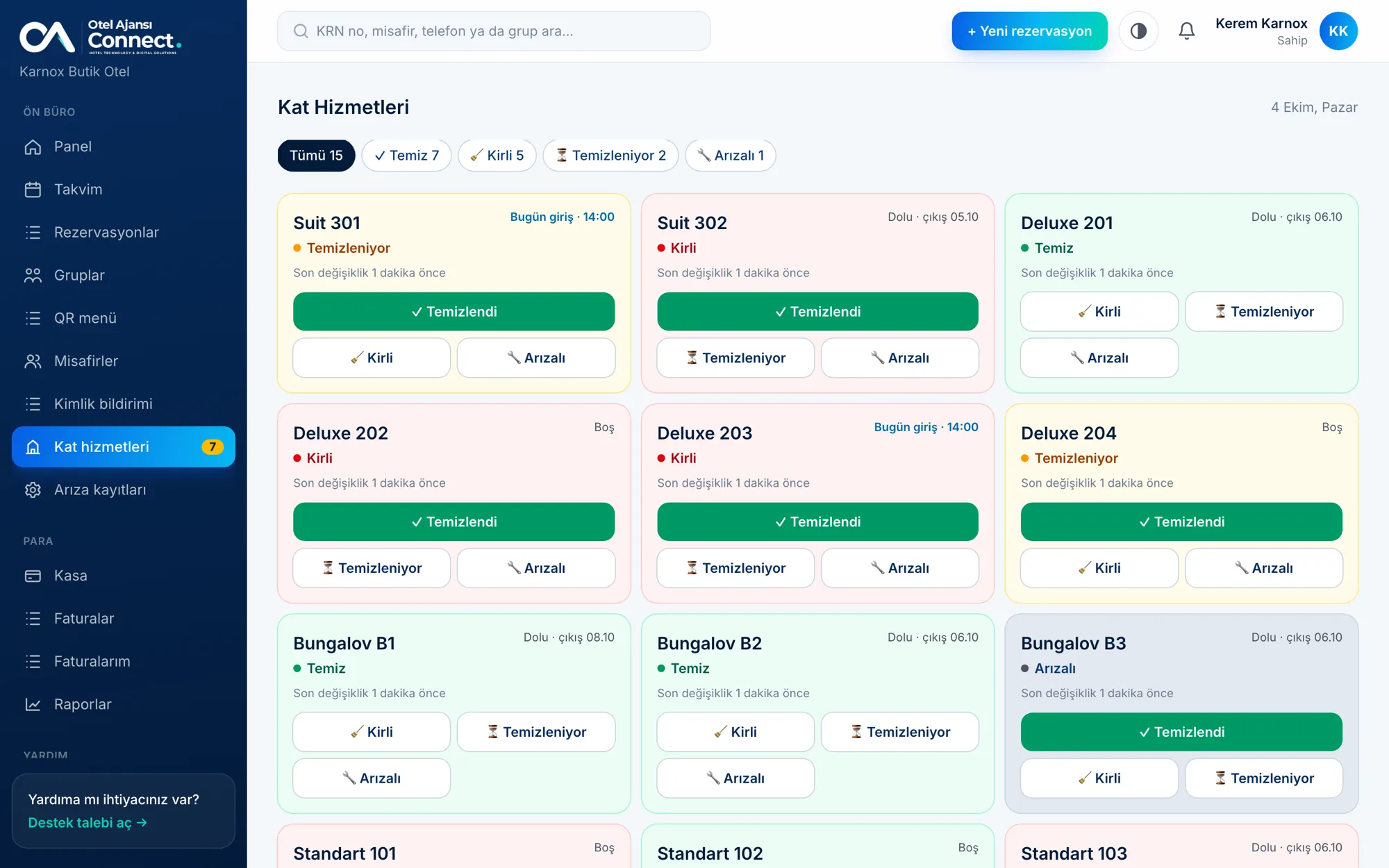
Housekeeping: room cleaning statuses
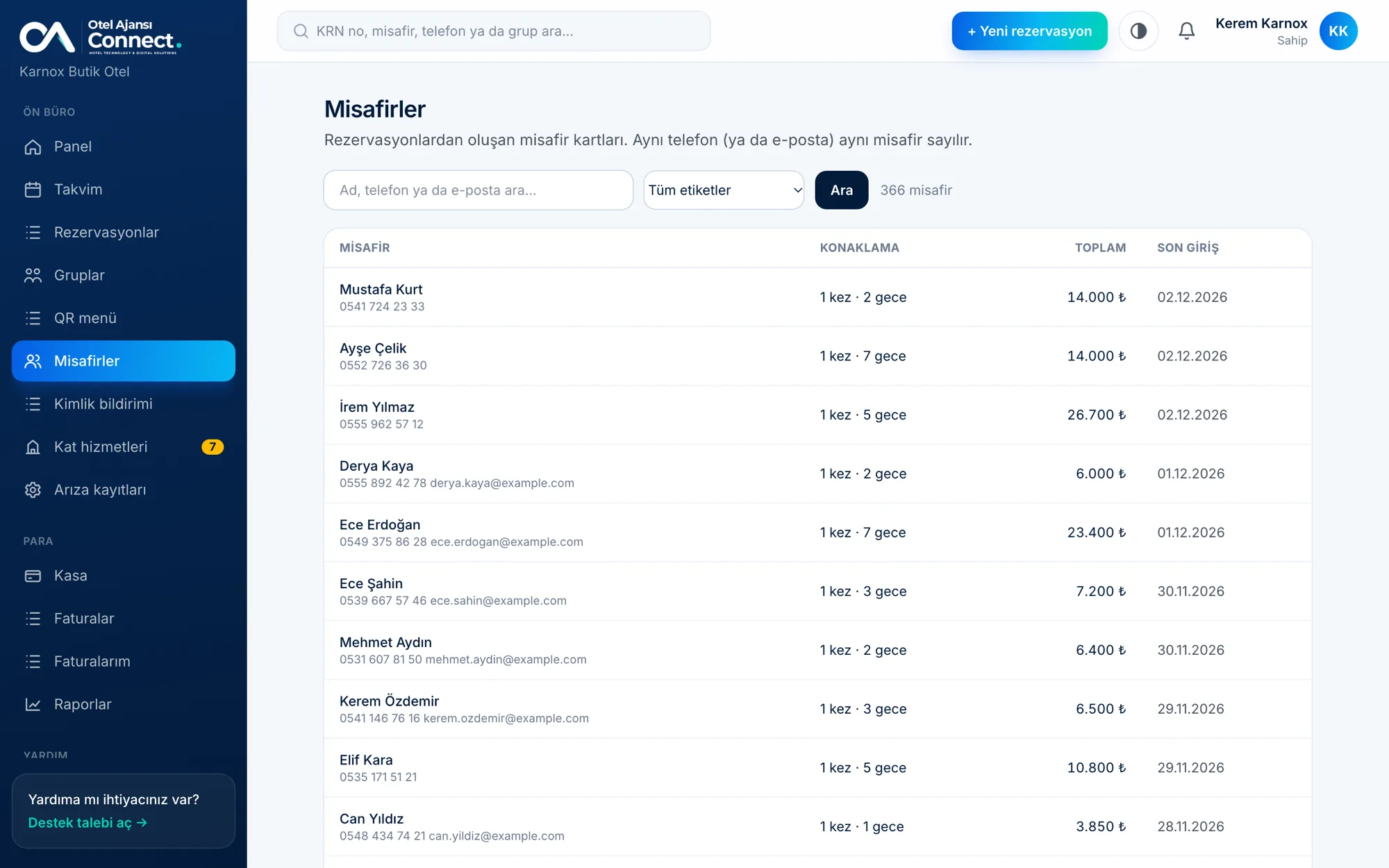
Guest profiles: stay history, notes and tags
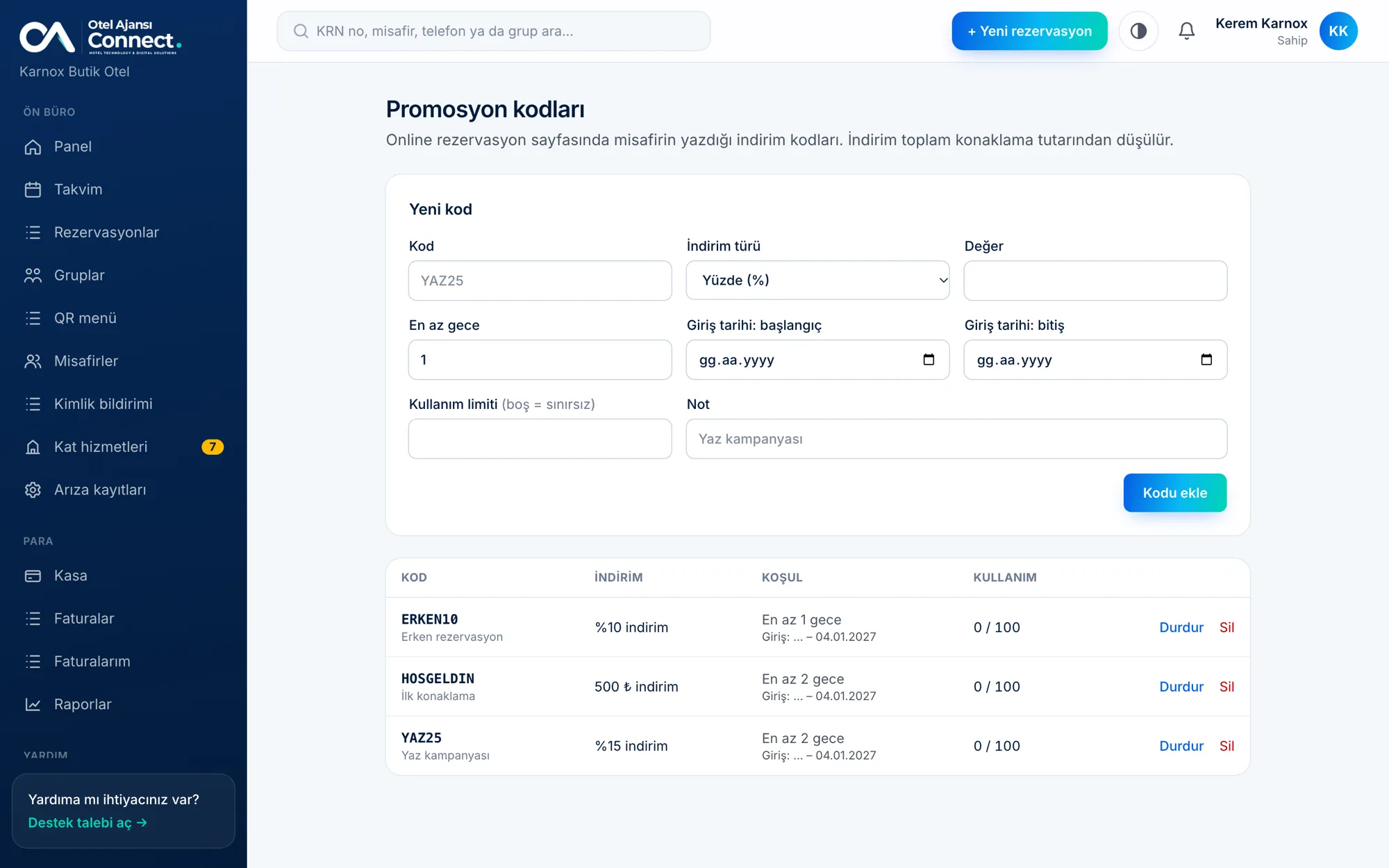
Promo codes: percentage or amount discounts with usage limits
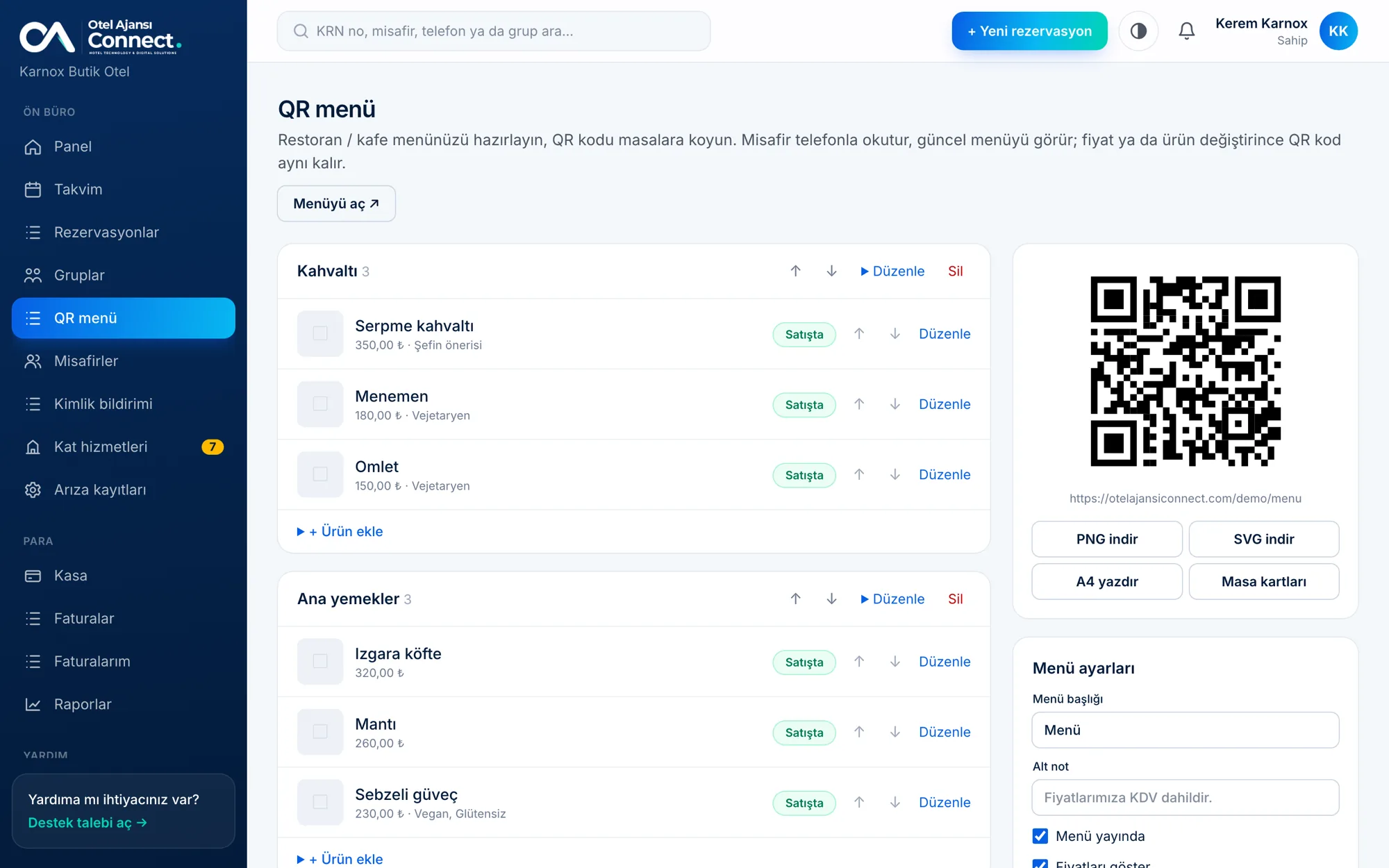
QR menu: your restaurant and cafe menu with a QR code for each table
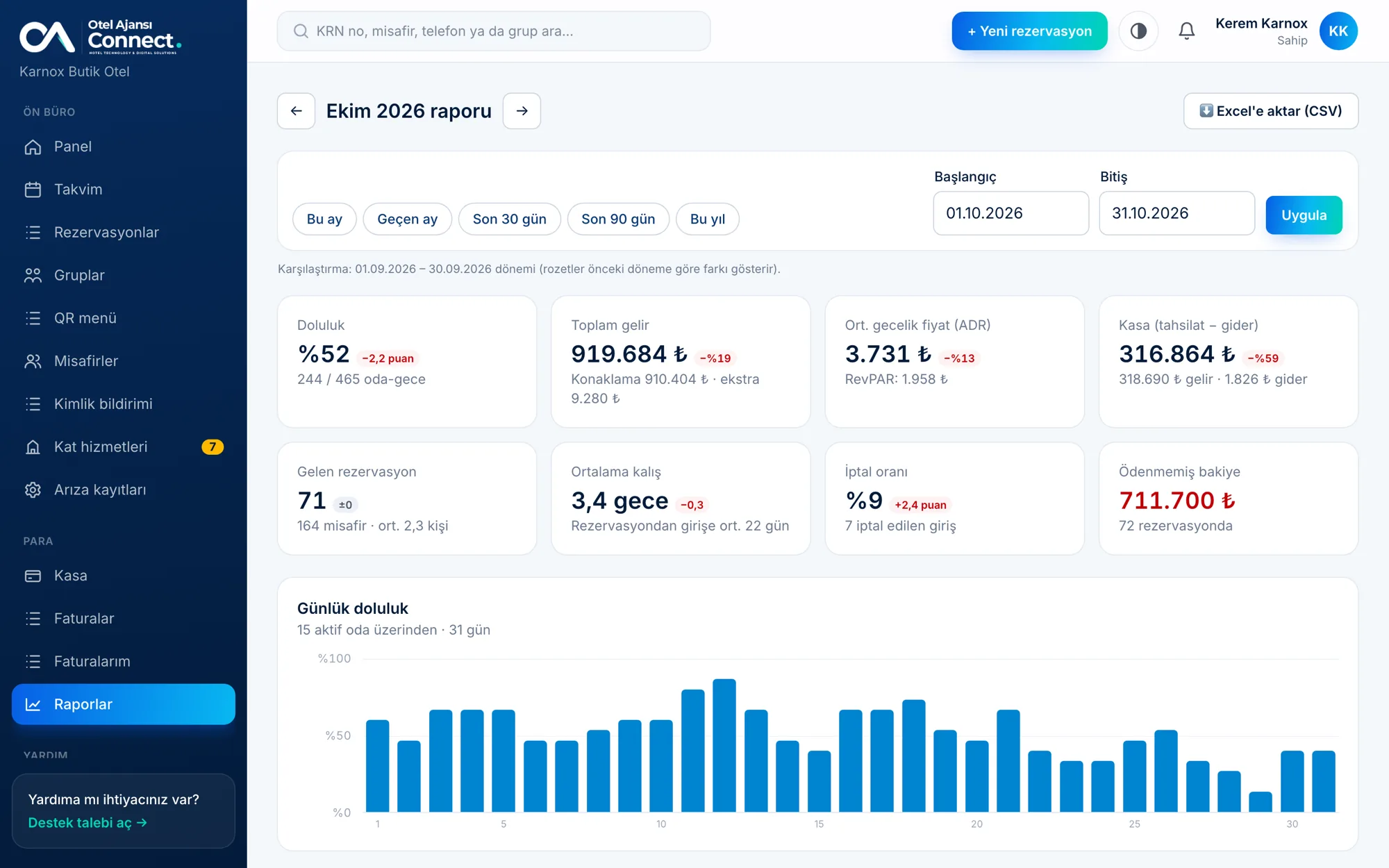
Reports: occupancy, revenue, average rate and room performance
Everything a hotel needs
You never type the same information twice; every screen works together.
Room Rack and calendar
See occupancy day by day and create bookings from an empty cell.
Reservation management
Check-in, check-out, cancellations, edits and automatic pricing.
Group bookings
Combine several rooms into one group and process them together.
Cash desk and folio
Income, expenses, deposits and extras; end-of-day report.
Flexible pricing
Seasons, weekends, guest counts and minimum stays.
Housekeeping
Clean, dirty, cleaning, out of order; a room turns dirty at check-out.
Online booking
Your own page and a date box you add to your website.
Reports
Occupancy, ADR, RevPAR, source breakdown and a 12-month trend.
Notifications
Phone, email or panel: whichever you prefer.
Staff and permissions
Owner, reception and housekeeper; everyone on their own screen.
Support requests
Open a request from the panel and get the reply as a notification.
Security
Email verification code, nightly backups, every hotel's data kept separate.
WhatsApp and SMS messages
Booking confirmations, changes, cancellations, vouchers and arrival reminders go to guests automatically.
ID scanning and KBS
Scan an ID with the phone camera and the form fills itself; the daily Turkish KBS list is ready.
Invoices and e-Archive
Create invoices from bookings and turn them into official invoices with an e-Archive integration (Nilvera, Uyumsoft).
Online card payments
Deposits or prepayments on the booking page; money goes straight to the hotel's account.
Channel calendar sync
Keep availability in sync with the calendars of channels like Booking.com via iCal.
Promo codes
Boost direct sales with discount codes and track their use.
Guest profiles
Recognize returning guests with stay history, notes and tags.
Multilingual booking page
Turkish, English and German; foreign guests book in their own language.
Summary reports
Daily and weekly summary reports by email.
API and webhooks
Connect your own systems: access reservations through the API and event webhooks.
Writing with AI
Draft descriptions and guest replies with one click.
Restaurant and cafe management
Floor plan, waiter POS, split and merge tabs; cash, card and room-charge payments.
Kitchen display
Orders land on stations; preparation and delay status is tracked live.
QR menu and table ordering
Menu and ordering via the QR on the table; orders go straight to the kitchen.
Room service and stay packages
Room service verified by room number and surname; half-board and all-inclusive rules.
Stock, recipes and cost
Automatic stock deduction from recipes, waste, counts and gross profit per product.
Channel manager connection
HotelRunner bookings arrive in the panel automatically; agency commission and channel source are reported.
Google Calendar sync
Bookings are written per room to the Google account you choose; share the calendar link with your assistant.
Live chat window
Messages from the chat bubble on your booking page reach the panel and your phone.
Your hotel website and SEO
A multi-page hotel site with rooms, gallery, FAQ and blog; booking or inquiry mode.
Get started in one evening
No software to install and no technical knowledge needed.
-
1
Explore the demo
Fill in the form and your personal demo link arrives on WhatsApp and by email; try every screen in a demo hotel full of realistic data.
-
2
Choose your plan
Try it free for 14 days, or pick a plan and start right away by card; we can also call you if you like.
-
3
Your account is opened
Your hotel address and owner account are prepared.
-
4
Add your rooms
Bulk-add rooms, type your prices and start taking bookings.
Plans
Monthly and simple. Choose by room count; upgrade any time.
Premium
Let's talk
A quote tailored to your hotel
- Reservations, Room Rack and calendar
- Cash desk, folio and reports
- Housekeeping and staff accounts
- Price periods and bulk update
- Online booking and hotel website
Enterprise
Sınırsız oda; kartla kapora, mesajlaşma ve özel alan adı.
Let's talk
A quote tailored to your hotel
- Reservations, Room Rack and calendar
- Cash desk, folio and reports
- Housekeeping and staff accounts
- Price periods and bulk update
- Online booking and hotel website
- QR menu (restaurant / cafe menu)
- Promo codes
- Guest profiles
- Invoice records
- Multilingual booking page
- Daily summary and weekly report email
- Booking notifications (SMS / WhatsApp)
- Online card deposits
- Connect your own domain (yourhotel.com)
Coming soon
- ◔ID registry (KBS) records
- ◔Online check-in (ID pre-form)
- ◔Booking.com and Airbnb calendar sync
To compare every feature side by side, see the plan comparison table.
Frequently asked questions
Do I need to install anything?+
No. It opens in your browser, and you can add it to your phone or tablet like an app. Notifications work too.
Is there a mobile app?+
Our iOS and Android apps are being prepared for the App Store and Google Play and will be available very soon. Today you can already open the panel in your phone browser, add it to your home screen and receive notifications.
Can double bookings (overbooking) happen?+
No. Every booking is checked for room and date overlaps; the same rule applies from the panel and from the website.
Is my data safe?+
Each hotel's data is kept separate. A verification code is required at login and the database is backed up every night.
How are payments taken on online bookings?+
If you wish, you take card deposits or prepayments with the hotel's own PayTR account and the money goes straight to the hotel. Otherwise payment is taken at the hotel and you post the deposit to the cash desk from the panel.
Does it work with my existing website?+
Yes. Paste the one-line code from the panel into your site; a date-picker box appears and guests are sent to your booking page.
How do I manage prices?+
You type the normal price, and for date ranges such as summer season or holidays you enter the price for those dates. There is no percentage math. A separate screen updates all rooms in bulk.
Are WhatsApp or SMS messages sent to guests?+
Yes. Booking confirmation, changes, cancellations, vouchers and arrival reminders are sent automatically. You buy message credit from the panel and choose which messages go out.
How do I collect ID details, is there a police (KBS) notification?+
You scan the guest's ID with the phone camera and the form fills itself (the ID image is not sent to the server). The daily KBS list is ready in the panel; the official KBS connection requires a separate application process with the authority.
Can I issue invoices?+
Yes. Invoices are created from bookings; with an e-Archive integration (Nilvera or Uyumsoft) they become official e-Archive invoices.
Can my staff use it too?+
Yes. There are owner, reception and housekeeper roles, plus waiter, cashier, kitchen, storekeeper and manager roles for the restaurant side; everyone sees only the screens relevant to their job.
Can I also manage my hotel's restaurant, cafe or bar?+
Yes. With the Food & Beverage module you define your restaurant, cafe and bar outlets and manage the floor plan, waiter POS, kitchen display, QR-menu ordering, stock and recipe costing from the same panel. Charging a guest's bill to their room is possible too. The module is enabled according to your plan.
Does it work with a channel manager (HotelRunner)?+
Yes. Once you connect your HotelRunner account, bookings from the channels land in the panel automatically; you see agency commission and channel source in the reports. You keep managing prices and availability in your channel manager.
Can I see my bookings in Google Calendar?+
Yes, optionally. You pick and link your Google account and bookings are written per room to a separate calendar. If you prefer not to link an account, you can add the private subscription address to any calendar app.
What if I run into a problem?+
Open a support request from inside the panel; the reply reaches you both in the panel and as a notification.